Engaging Classroom Games for Teaching: AI and Jeopardy

Aug 19, 2026

Exams are stressful. Review sessions don’t have to be.

If you’re looking for a way to energize your classroom and make pre-exam review sessions more engaging, Jeopardy-style games might be your secret weapon.

These engaging classroom games aren’t just fun — they’re proven to boost memory, recall, and participation.

Best of all?

With Flex’s AI-driven Jeopardy game builder, you can build and run a customized Jeopardy game in under 3 minutes.

The image displays the iconic "Jeopardy!" game show logo in bold, silver letters against a vibrant background with starry effects and gradient hues of purple, pink, red, and orange. Perfect for classroom games for college students, the word "Jeopardy!" stands out prominently in the center.

Let’s break down how to transform your review sessions from passive to powerful with one of the simplest and, most effective classroom engagement tools available.


How Flex Makes Jeopardy Game Creation Easy

Jeopardy’s game-show format is instantly recognizable and exciting, making it a fun and flexible way to teach nearly any subject.

With Flex: Higher Education’s Teaching Assistant, you can:

  • Create a game in less than 3 minutes
  • Customize questions to fit your course
  • Download a clean PowerPoint version of your game — no tech headaches

💡 Want to see it in action? Watch the demo of Flex’s Jeopardy feature below.

Why Use Engaging Classroom Games Like Jeopardy?
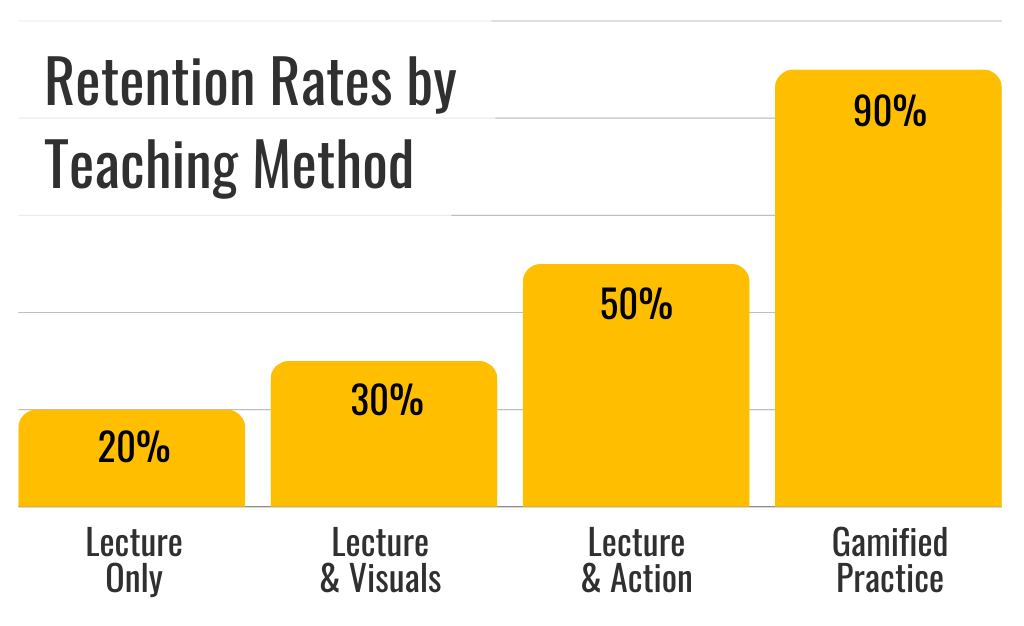
Gamified learning works — and it’s backed by research.

Studies show that students retain more information when learning is interactive and fun.

gamification increases student engagement and retention

Benefits of Games in the Classroom:

  • Boosts engagement: Keeps students alert and active during review sessions.
  • Improves retention: Game-based repetition improves recall better than lecture alone.
  • Encourages collaboration: Students work together, building team skills.
  • Fits any topic: No matter the subject, our tools make it easy to gamify your curriculum.

An infographic highlighting gamified learning. The top half shows a circular chart and text stating an 89% increase in student performance via challenge-based, gamified learning, sourced from ScienceDirect. The bottom half shows human icons and text indicating 67% of students found classroom games for college students more motivating and engaging than traditional courses, sourced from Intuition.


BINGO! Another Game To Engage Your Students

Flex is more than a one-trick tool.

It’s built to save professors time and increase student engagement throughout the academic year.

Trade your slide deck for Bingo cards, and you’ve got an engaging way to introduce new topics! 

Bingo is a ton of fun to play, but generating cards can be a hassle… until now!

Entrepreneurship bingo

Flex makes it easy to build custom Bingo cards for any course, helping you bring more interactivity into your classroom in seconds.


Introducing Flex: Your Personal Teaching Assistant

Flex is a specialized higher education assistant, created by professors for professors.

Request an invitation and get access to Flex for the rest of 2024! See how it can:

Request your invitation and use Flex to recap!

Get Your Flex Invite Today

See Flex in Action!

Check out the video below for a comprehensive demo of Flex’s capabilities:

Categories

Popular Posts

Want More Exercises?

Check out the new…

Learn More

Related Posts

Slido vs Kahoot for College Classes: Which to Use and When

Short answer: Neither wins outright; pick by the job. Kahoot is a game: its classic mode gives more points for faster correct answers, so it suits fast, competitive review. Slido is built for audience Q&A and polls, and its quiz ranks students by correct answers...

How to Teach Entrepreneurship to College Students

Short answer: Teach entrepreneurship by having students do it, not just read about it. Start with a problem they are living right now, tie the course to what each student cares about, then have them test assumptions, interview real customers, build a quick minimum...

Peer Feedback on Student Presentations in 8 Steps

Peer Feedback on Student Presentations in 8 Steps

Peer feedback is one of the most powerful elements of student presentations.Presenters hear what landed and how to improve, while students providing feedback improve their presentation skills by critically evaluating others. Not to mention, peer feedback ensures...

Join 15,000+ instructors
and get new resources:

New Lesson Plans

New Syllabi

Free Invites to Teaching Workshops